WhatsApp team inbox
A Manychat alternative.
Built around your next reply.
Give customer enquiries a human owner.
Looking for a Manychat alternative for WhatsApp customer service? Gatherdesk brings WhatsApp, email and website chat into a queue your team can claim, answer and resolve. It is a different fit from building social marketing campaigns.
Explore with your team · No card needed to request a trial
Customer enquiry
“Could you help us arrange a visit next week?”
A clear next reply
Check the details and agree the next step with the customer.
Connected channels feed the pool. Access, plan and channel setup determine what each team member can use.
Your team’s daily workspace
Shared inbox.
Clear responsibility.
Give incoming enquiries a place to land and your colleagues a clear way to work together.
- Email, WhatsApp and website chat in one shared enquiry pool, after each channel is connected.
- Claim a conversation, see its owner and hand it to another team member with the right permissions.
- Keep incoming replies and conversation history together; capture available customer details in client records.
- Use enabled reply templates and optional AI for configured chat channels. A staff reply pauses AI until it is resumed.
- Give administrators, managers and agents access suited to their responsibilities.
Inside Gatherdesk
The reply, the owner,
the whole conversation.
Open a conversation to see the customer’s messages and the team’s replies together. Ownership makes the next action clear; history gives the next colleague context.
See how enquiry ownership works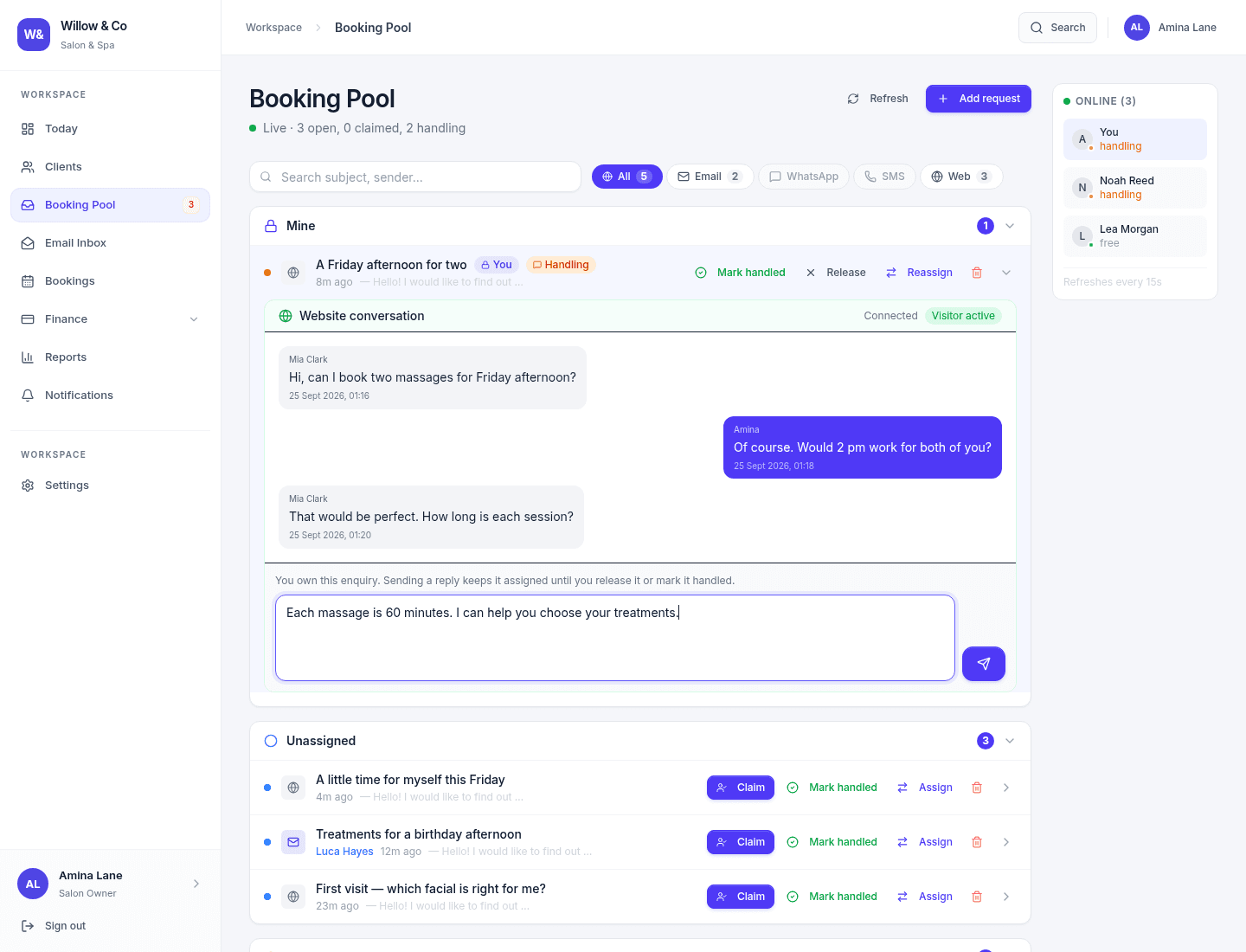
Compare around your workflow
What would a good working day look like?
Manychat is a chat marketing platform used to build automated conversation flows on Instagram, Messenger and WhatsApp. Here is the Gatherdesk workflow to explore with your team.
| Your team needs to… | With Gatherdesk |
|---|---|
| Know who is replying | A conversation has a visible owner and can be reassigned by authorised staff. |
| Share email, WhatsApp and web chat | Connected channels feed the shared pool, with access controlled by role and assignment. |
| Keep the customer’s context | Reply history and available contact details stay accessible to the right team members. |
| Choose when AI helps | Configure a provider and channel instructions, take over the reply and resume AI when appropriate. |
| Make a confident start | Pilot one connected channel and test the handover with your own team. |
Product context reviewed 9 October 2026 using Manychat’s official product overview. Gatherdesk is an independent product; capabilities and plans can change.
A practical first step
Start with one channel. Build from there.
- 01
Choose one mailbox or one website page for a pilot. Keep your existing customer history available in its current system.
- 02
Connect the mailbox using IMAP/SMTP or install the website widget. For WhatsApp, confirm Meta account, number and permissions requirements before changing a live setup.
- 03
Ask two team members to test a new enquiry, an assignment, a reply and a returning customer. Check both manager and agent access.
- 04
Review the results and channel coverage before expanding. There is no automatic import of your existing conversations.
Before you decide
Good questions.
Straight answers.
Who should consider Gatherdesk as a Manychat alternative?
Looking for a Manychat alternative for WhatsApp customer service? Gatherdesk brings WhatsApp, email and website chat into a queue your team can claim, answer and resolve. It is a different fit from building social marketing campaigns.
Does Gatherdesk replace Manychat Instagram automation?
No. Gatherdesk has no native Instagram inbox or comment-triggered DM flows. Use it for supported customer-service channels, not as a drop-in replacement for social marketing automation.
Can Manychat hand conversations directly to Gatherdesk?
There is no native Manychat connector. Do not assume the same WhatsApp number can run on both configurations without checking Meta requirements and testing the intended setup first.
Which channels can my team use?
Email through a connected IMAP/SMTP mailbox, the Gatherdesk website chat widget and WhatsApp through Meta Cloud API. Access depends on your plan and channel configuration. Instagram, Messenger, SMS and phone calling are not native inbox channels today.
Can AI reply automatically?
Yes, for supported chat channels when an administrator configures an AI provider and channel settings allow automatic replies. Staff can take over and resume AI. Email replies stay under staff control.
Can I move my existing conversations automatically?
There is no automatic migration from your current platform. Start with new enquiries on one channel and retain access to historical conversations in your existing system.
What does Gatherdesk cost?
There is a Free plan for one person and a 14-day trial of paid plans. The pricing page shows current prices, seat limits and included modules. Sending a trial request does not start billing.
Let’s put your next enquiry in good hands.
See your team’s workflow in a demo, or request trial access and explore it together.
No card required · See Gatherdesk pricing